

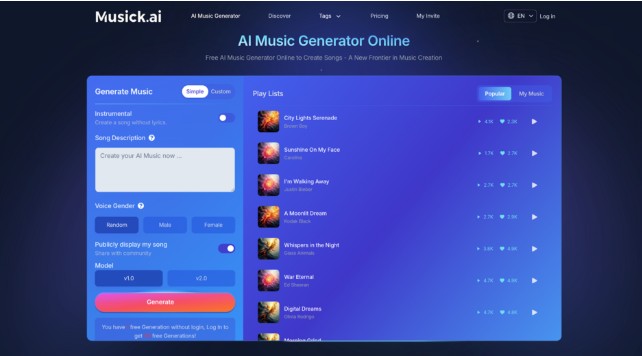
Most creators know the feeling: the video is edited, the podcast is ready to export, and the one thing missing is the right background track. Searching royalty-free libraries takes time, licensing music takes money, and hiring a composer is rarely an option. That’s where Musick AI changes the game — it’s a free AI Music Generator that lets anyone go from a simple text description to a finished, downloadable track in seconds.
I. Why Background Music Still Slows Creators Down
The search-and-license loop is a real bottleneck
Finding the right music for a project isn’t just a creative problem — it’s a logistics problem. Most royalty-free libraries offer pre-made tracks that weren’t built around your specific scene, mood, or pacing. Creators often end up cycling through dozens of options before settling for something “good enough.”
Generic music hurts the final product
When a track doesn’t match the energy of the video or podcast, viewers notice. A corporate explainer with lo-fi hip-hop or a heartfelt travel vlog backed by EDM — the mismatch signals low production quality, even if everything else is polished.
Copyright risk is still real
Even with royalty-free libraries, the licensing terms vary widely by platform and use case. One wrong upload can mean a claim on YouTube or a takedown on Instagram. Creators need music that’s built to be used commercially, without constant second-guessing.
II. What Musick AI Actually Does
Describe it, and it generates it
Musick AI works by taking a text prompt and turning it into a complete song. Instead of browsing for something close to what’s needed, a creator can type something like “acoustic pop about the holidays” and receive a track that matches that specific brief. The more detail in the prompt — genre, mood, instruments, tempo — the more targeted the output.
Genre coverage is broad
The tool supports a wide range of styles including EDM, R&B, Hip-hop, Pop, Jazz, Rock and Roll, Metal, Blues, Reggae, Classical, K-pop, Disco, Country, and more. This matters because different creator niches have different sonic needs — a gaming channel needs something different from an educational video series.
Songs with or without lyrics
Creators can generate instrumental-only tracks or full songs with vocals. There’s also a vocalist gender preference setting that adds another layer of customization to the output.
Built-in tools beyond basic generation
Beyond the core generator, Musick AI includes:
- An AI Song Lyrics Generator that takes genre inputs and produces song lyrics
- An AI Beat Producer for building out melody-based compositions
- An AI Rap Generator for crafting rap-style tracks with customized playlists and structure
III. How to Get a Track in Minutes
1.Write a clear prompt
Open Musick AI and go to the Generate Music section. Describe the type of music wanted — include genre, mood, and any thematic elements. A prompt like “uplifting, energetic pop with bright synths and dynamic percussion, good for a summer campaign” gives the AI clear direction.
2.Select instrumental or vocal
Choose between a full song (with vocals) or an instrumental version. If vocals are included, select a preferred vocalist gender.
3.Pick a model and generate
Musick AI offers different model options for generation. After selecting the preferred one, hit generate. The output appears in the queue within seconds.
4.Preview and download
After generation, the track is playable directly in the browser. If it fits, download it. If not, adjust the prompt and regenerate.
IV. Who This Actually Works For
Content creators on YouTube and social media
YouTubers, TikTok creators, and Instagram video producers need tracks that won’t trigger copyright claims. Musick AI generates music with a commercial license included, meaning the output is cleared for use on YouTube, Instagram, Facebook, LinkedIn, and Twitter.
Podcast producers
Intro music, background ambiance, and transitional stings — podcasts need short, repeated audio elements more than full songs. The ability to generate short loops or full tracks specifically built around a described vibe makes Musick AI useful for audio-first formats.
Filmmakers and video editors
Matching music to a scene’s emotional beat matters in film. An AI Music tool that accepts mood and theme descriptions gives editors a faster path to finding something that works — without waiting on a composer or paying licensing fees per project.
Educators and students
Musick AI is specifically noted as useful for high school musical contexts — students and teachers can generate original compositions for projects, presentations, or school performances without needing any prior music production knowledge.
Game developers and app builders
Background music for games and apps needs to loop cleanly and stay non-distracting. Custom-generated tracks tailored to a specific atmosphere — whether tense, adventurous, or ambient — solve that problem without a dedicated audio team.
 V. The Copyright Question, Answered
One thing that consistently worries creators is whether AI-generated music is actually safe to use commercially. Musick AI addresses this directly: the music library is built with full consent from source data, and the generated outputs come with a commercial license. This means creators can use the tracks on social platforms, in brand videos, and in client work without copyright concerns.
VI. Tips for Better Outputs
- Be specific in the prompt
Vague prompts produce average results. Including details like “jazz saxophone, late night, melancholic” will produce a far more useful track than just typing “jazz.”
- Use genre tags, not artist names
Musick AI recommends describing the style and vibe using genre and mood terms rather than referencing specific artists. This keeps the output original and avoids potential rights complications.
- Try the AI Beat Producer for instrumental work
For creators who want more hands-on control over melody structure, the AI Beat Producer allows melody notes to be written in directly — making it closer to a composition tool than just a generator.
VII. From First Prompt to Final Download
The gap between “I need music for this” and “I have a track ready to use” used to require either time, money, or both. Musick AI closes that gap by giving creators an AI Song Maker that responds to plain-language prompts and returns full songs — with vocals, custom genres, and commercial licensing — in under a minute. For creators who publish frequently, that’s not just convenient. It’s a meaningful change to how fast a project can actually ship.
